
Klarna
Buy now pay laterKlarna is the largest provider of buy now, pay later services in the world
Klarna Pay Over Time
Allows customers to pay for their purchase in installments. To configure Klarna Pay Over Time, follow these steps:
-
In Adyen:
- Enable Klarna Pay Over Time in your Adyen account.
- Configure the payment method settings according to your business requirements.
-
In VTEX:
- Payment Method Configuration: Go to the VTEX admin panel and access the payment methods section
https://{{account}}.myvtex.com/admin/pci-gateway#/rulesor type payments in the Admin search box and click on Payments. - in the Payment Methods screen, click on the
 button at the top right corner of the page.
 - Find the Klarna Pay Over Time option in the list of available payment methods and click on it.
- In the Add Payment Method screen, select the Provider in the "Process with Provider" selection box.
- Save the configuration. After that follow the steps detailed in the Configuring the Payment Provider in VTEX
- Payment Method Configuration: Go to the VTEX admin panel and access the payment methods section
Klarna Pay Now
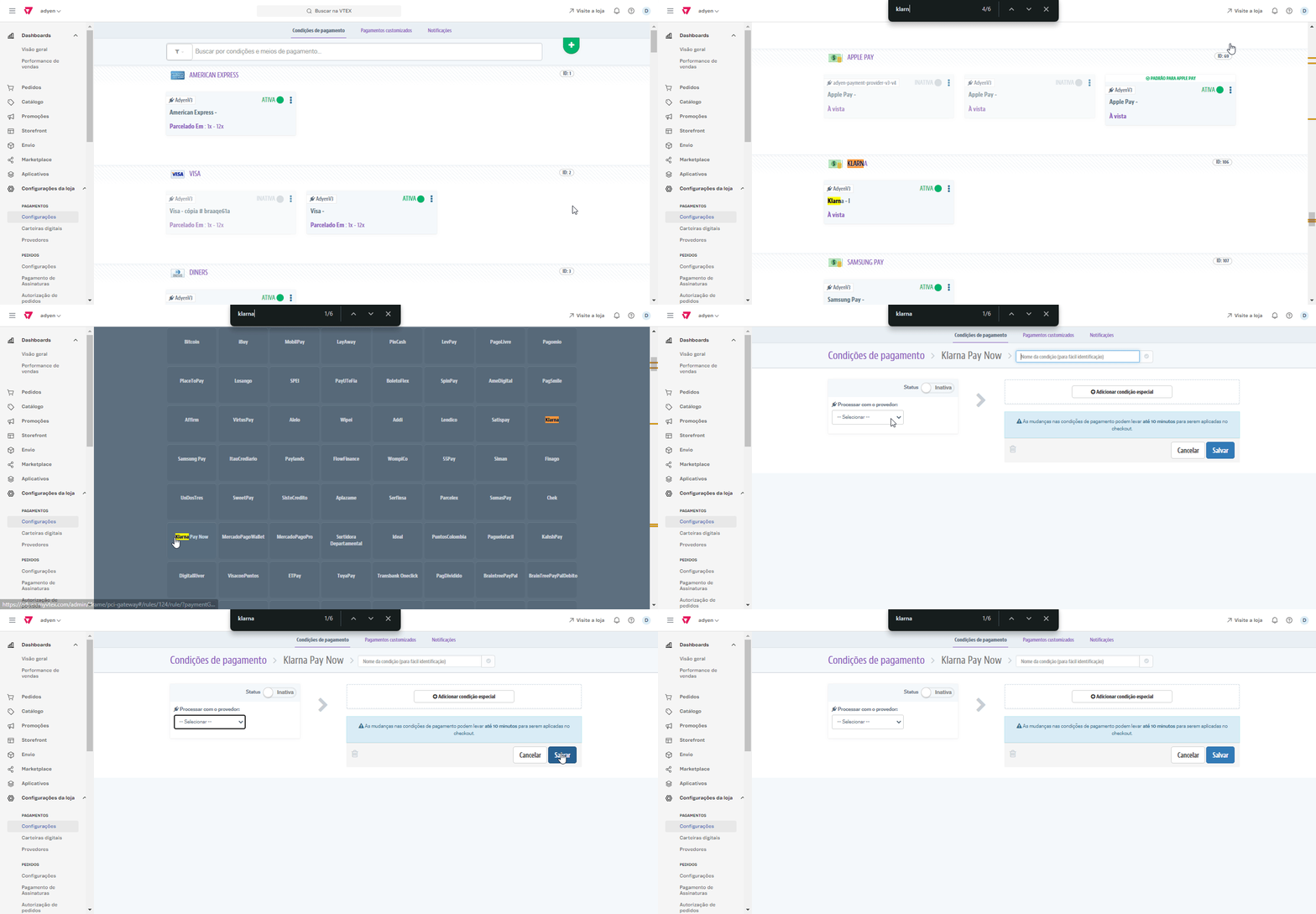
Allows customers to pay for their purchase immediately via bank transfer. To configure Klarna Pay Now, follow these steps:
-
In Adyen:
- Enable Klarna Pay Now in your Adyen account.
- Configure the payment method settings according to your business requirements.
-
In VTEX:
- Payment Method Configuration: Go to the VTEX admin panel and access the payment methods section
https://{{account}}.myvtex.com/admin/pci-gateway#/rulesor type payments in the Admin search box and click on Payments. - in the Payment Methods screen, click on the button at the top right corner of the page.
- Find the Klarna option in the list of available payment methods and click on it.
- In the Add Payment Method screen, select the Provider in the "Process with Provider" selection box.
- Save the configuration. After that follow the steps detailed in the Configuring the Payment Provider in VTEX
- Payment Method Configuration: Go to the VTEX admin panel and access the payment methods section
Klarna Pay Later
Allows customers to pay for their purchase in 30 days without interest. To configure Klarna Pay Later, follow these steps:
-
In Adyen:
- Enable Klarna Pay Later in your Adyen account.
- Configure the payment method settings according to your business requirements.
-
In VTEX:
- Payment Method Configuration: Go to the VTEX admin panel and access the payment methods section
https://{{account}}.myvtex.com/admin/pci-gateway#/rulesor type payments in the Admin search box and click on Payments. - in the Payment Methods screen, click on the button at the top right corner of the page.
- Find the Klarna Pay Later option in the list of available payment methods and click on it.
- In the Add Payment Method screen, select the Provider in the "Process with Provider" selection box.
- Save the configuration. After that follow the steps detailed in the Configuring the Payment Provider in VTEX
- Payment Method Configuration: Go to the VTEX admin panel and access the payment methods section
Business Rules
Payment Flow
- The customer selects Klarna as the payment method at checkout.
- The customer chooses among the available payment options: Pay Now, Pay Over Time, or Pay Later.
- The system redirects the customer to Klarna for authentication and transaction approval.
- Klarna confirms the payment and sends a webhook to the connector.
- The connector approves the payment and updates VTEX.
Specific Rules
- Pay Now: The full amount is immediately debited from the customer's bank account or card.
- Pay Over Time: The customer pays in multiple installments according to Klarna's options.
- Pay Later: The customer has a set period to make the payment without additional interest (according to Klarna and merchant rules).
- Authorization: Performed by Klarna and may be subject to a credit check.
- Capture: Automatic after payment approval.
- Refund: Allowed in partial or full amounts, depending on Klarna's rules.
- Cancellation: Can only be done before capture; after that, a refund is required.
Was this page helpful?